RingCX Embeddable
Introduction
RingCX support has been merged into RingCentral Embeddable. Starting with RingCentral Embeddable 3.1.x, a single embeddable widget lets developers integrate both RingCentral RingEX (phone, SMS, meetings) and RingCX (contact center agent) services into their web applications with a few lines of code.
Recommended: use RingCentral Embeddable 3.1.x for RingCX
We recommend that new integrations use RingCentral Embeddable 3.1.x with RingCX enabled. The standalone RingCX Embeddable (engage-voice-embeddable) is superseded by RingCentral Embeddable. Existing integrations should follow the migration guide below.
RingCX support is part of the RingCentral Embeddable 3.1.x beta. We welcome your feedback and bug reports — please feel free to open an issue on GitHub.
Supported features
- One RingCentral login for both RingEX and RingCX — no second login or extra app scope
- Agent tab with agent session and agent states
- Voice queues
- Dial modes
- Manual
- Predictive dial mode
- Preview dial mode (leads)
- Progressive dial mode
- Call disposition
- Notes
- Disposition
- AI Summary
- Agent scripts
- Voicemail drop
- Call logging, contact matching and lead viewing in your app, using the same service protocol as RingEX calls
Visit Online
Visit the online demo: https://apps.ringcentral.com/integration/ringcentral-embeddable/3.1.x/index.html
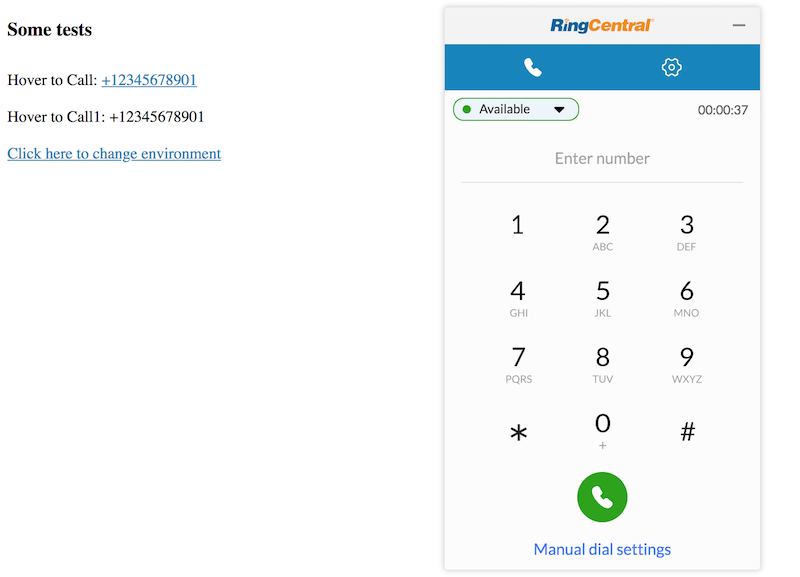
Enable RingCX
Register your app and get a RingCentral client ID by following Registering your application. Then add the following code into any web app's page, with enableRingCX=1 in the adapter.js URL:
<script>
  (function() {
    var rcs = document.createElement("script");
    rcs.src = "https://apps.ringcentral.com/integration/ringcentral-embeddable/3.1.x/adapter.js?clientId=YOUR_RINGCENTRAL_CLIENT_ID&enableRingCX=1";
    var rcs0 = document.getElementsByTagName("script")[0];
    rcs0.parentNode.insertBefore(rcs, rcs0);
  })();
</script>
RingCX is off by default and cannot be turned on at runtime. When enableRingCX is on and the signed-in RingCentral user has a RingCX account, the widget shows an Agent tab. The agent session starts when the user starts it from the Agent tab, or when your page calls RCAdapter.startRingCXAgentSession(). A session that has reached ready is restored automatically when the widget reloads, until the agent ends it.
Optional parameters:
| Parameter | Default | Description |
|---|---|---|
enableAgentScript |
off | Show RingCX agent scripts in the side panel during calls. Use it with enableSideWidget=1. |
enableVoicemailDrop |
off | With enableSideWidget=1, lets agents drop a pre-recorded message on outbound RingCX calls. |
See All parameters for the full list.
Integrate with your app
RingCX calls use the same rc-* events and rc-adapter-register-third-party-service protocol as RingEX calls, so you do not need a second protocol. Read call.source: 'ringcx' means a RingCX call, and RingCX-only fields are under call.ringcx.
Register your service, then handle call logging, contact matching and lead viewing requests:
var registered = false;
function postToWidget(message) {
  document.querySelector("#rc-widget-adapter-frame").contentWindow.postMessage(message, '*');
}

window.addEventListener('message', function (e) {
  var data = e.data;
  if (!data) {
    return;
  }
  // Register the service when the widget is loaded
  if (data.type === 'rc-login-status-notify' && !registered) {
    registered = true;
    console.log('RingCX available:', data.features && data.features.ringCX);
    postToWidget({
      type: 'rc-adapter-register-third-party-service',
      service: {
        name: 'TestService',
        callLoggerPath: '/callLogger',
        callLoggerTitle: 'Log to TestService',
        callLogEntityMatcherPath: '/callLogger/match',
        contactMatchPath: '/contacts/match',
        leadViewerPath: '/leads/view', // adds "View lead" button in the Lead tab
      }
    });
  }
  // Call events
  if (data.type === 'rc-call-ring-notify' || data.type === 'rc-call-start-notify') {
    if (data.call.source === 'ringcx') {
      console.log('RingCX call:', data.type, data.call);
    }
  }
  if (data.type === 'rc-ringcx-call-disposed-notify') {
    console.log('disposition:', data.call.ringcx.disposition, data.call.ringcx.notes);
  }
  if (data.type === 'rc-ringcx-agent-state-notify') {
    console.log('agent state:', data.state, data.auxState);
  }
  if (data.type === 'rc-ringcx-lead-notify') {
    // action: loaded, passed, dialed or updated
    console.log('lead event:', data.action, data.leads || data.lead);
  }
  // Requests from the widget
  if (data.type === 'rc-post-message-request') {
    if (data.path === '/callLogger') {
      // triggerType 'callDisposition' means the call is logged automatically after disposition
      console.log('log call:', data.body.triggerType, data.body.call);
      postToWidget({ type: 'rc-post-message-response', responseId: data.requestId, response: { data: 'ok' } });
    }
    if (data.path === '/callLogger/match') {
      // map call ids from the request to your logged entities; for RingCX calls, the id is the RingCX call uii
      postToWidget({ type: 'rc-post-message-response', responseId: data.requestId, response: { data: {} } });
    }
    if (data.path === '/contacts/match') {
      var contactMapping = {};
      data.body.phoneNumbers.forEach(function (phoneNumber) {
        contactMapping[phoneNumber] = [{
          id: phoneNumber,
          type: 'TestService',
          name: 'Test User ' + phoneNumber,
          phoneNumbers: [{ phoneNumber: phoneNumber, phoneType: 'direct' }],
        }];
      });
      postToWidget({ type: 'rc-post-message-response', responseId: data.requestId, response: { data: contactMapping } });
    }
    if (data.path === '/leads/view') {
      console.log('view lead:', data.body.lead);
      postToWidget({ type: 'rc-post-message-response', responseId: data.requestId, response: { data: 'ok' } });
    }
  }
});
You can also control the widget through the global RCAdapter object, for example to place a RingCX call:
RCAdapter.clickToCall(phoneNumber, { callWith: 'ringcx' });
Other helpers include startRingCXAgentSession(), endRingCXAgentSession(), setRingCXAgentState(state), dialRingCXLead(lead, destination) and controlCall(action, id, { source: 'ringcx' }).
See RingCX in Embeddable for the full list of events, commands, message requests, and call logging behavior.
Migrating from the standalone RingCX Embeddable
If you are using the standalone RingCX Embeddable (ringcx-embeddable / engage-voice-embeddable), replace its adapter.js with the RingCentral Embeddable 3.1.x adapter.js shown above, and map its events as follows:
| Standalone RingCX Embeddable | RingCentral Embeddable 3.1.x |
|---|---|
rc-ev-ringCall |
rc-call-ring-notify |
rc-ev-newCall |
rc-call-start-notify |
rc-ev-endCall |
rc-call-end-notify |
rc-ev-sip* |
rc-webphone-connection-status-notify |
rc-ev-clickToDial |
rc-adapter-new-call with callWith: 'ringcx' |
rc-ev-dialLead |
rc-adapter-ringcx-dial-lead |
rc-ev-loadLeads, rc-ev-manualPassLead, rc-ev-callLead |
rc-ringcx-lead-notify with action loaded, passed, or dialed |
rc-ev-logout |
rc-adapter-ringcx-end-agent-session |
rc-ev-setEnvironment |
evServer parameter |
rc-ev-register |
rc-adapter-register-third-party-service |
rc-ev-matchContacts |
contactMatchPath |
rc-ev-matchCallLogs |
callLogEntityMatcherPath |
rc-ev-logCall |
callLoggerPath |
rc-ev-viewLead |
leadViewerPath |
rc-ev-sideWidgetOpenNotify |
rc-adapter-side-drawer-open-notify |
rc-ev-setSideWidgetExtended |
Not carried. The host controls the drawer. |
Note that contactMatchPath receives plain phone numbers, the same as for RingEX calls. The phone-plus-call-type match key from the standalone RingCX Embeddable is no longer used; the call type is available on call.ringcx.callType.
See Migrating from the standalone RingCX Embeddable for the latest details.
Documentation
- RingCentral Embeddable 3.1.x
- RingCX in Embeddable
- Registering your application
- All parameters
- Service registration
- Log calls
- Events
- API
- RingCentral Embeddable GitHub repository
Legacy: standalone RingCX Embeddable
The standalone RingCX Embeddable is still available on GitHub for existing integrations, but it is no longer recommended for new projects.